
UVIMate - UV Index Now
Full Stack Cafe Pty LtdWeather
3.6145.00 Reviews
- Version
- 5.1
- Installs
- 100.00K
- Age Rating
- Everyone
Screenshots
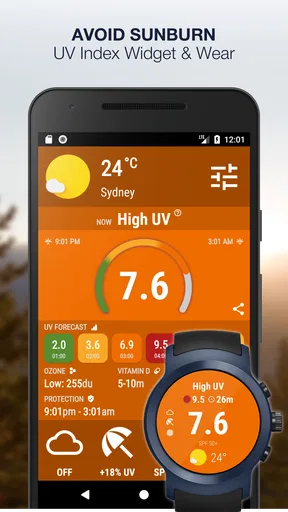
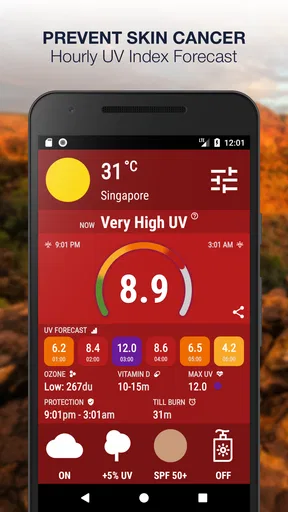
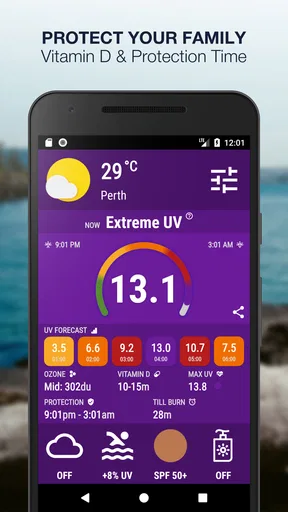
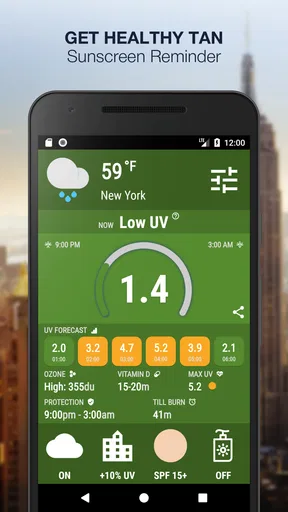
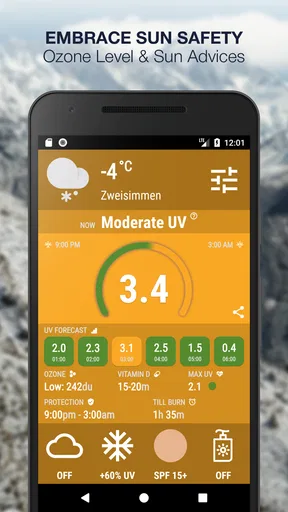
Our Review of UVIMate - UV Index Now
 Analysis by Appyee
UVIMate - UV Index Now is the kind of weather app I open for one practical reason: I want to know how seriously I should take the sun before I leave home. Instead of treating sunshine as a simple yes-or-no condition, it puts ultraviolet exposure at the center of the experience. That makes it useful for walks, outdoor work, beach days, school runs, cycling, and any plan where the temperature alone does not tell the whole story.
I found it most helpful when I stopped using it like a general weather replacement and treated it as a quick sun-safety check. The app comes from Full Stack Cafe Pty Ltd and is free to download, with optional in-app purchases ranging from $0.99 to $9.99 per item. Its audience is broad because it is rated for Everyone, but the value is especially clear for people who spend regular time outdoors or who want a simple reminder to think about UV exposure rather than heat.
The overall picture is positive, although not perfect. With a 3.6 average from around 1.8 thousand ratings and more than 100 thousand installs, it has attracted a real user base without looking like a universally loved weather essential. I can understand that middle-ground reaction. The app has a focused purpose and can become part of a reliable routine, but anyone expecting a complete replacement for a full weather service may find its scope too narrow.
How I use UVIMate before going outside
My baseline workflow is deliberately short. I open the app, check the current UV situation for my location, look ahead at the expected pattern, and then decide what kind of protection makes sense. That might mean sunglasses and a hat for a brief errand, sunscreen and covered clothing for a longer outing, or changing the time of a walk when the sun is likely to be more demanding.
This is a better use of the app than repeatedly checking it without a decision in mind. UVIMate is most valuable when the information changes an action. I do not need a long weather session before walking to a café, but I do want a quick answer before spending an afternoon outdoors. The focused design helps because I am not forced to sort through unrelated forecasts first.
A realistic example is a weekend park visit. A mild temperature can create a false sense of safety, especially when there is a breeze or light cloud. I would check the UV forecast before leaving, pack protection accordingly, and use the app again if the visit stretches into a different part of the day. That habit is more useful than guessing from how warm the air feels.
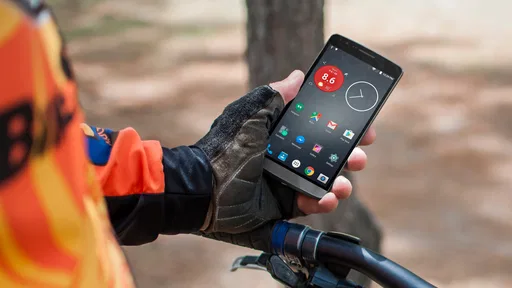
The same workflow works for parents planning outdoor time. I would use the app as a prompt to prepare hats, shade breaks, and sunscreen rather than as a medical authority or a guarantee that exposure is harmless. It is also useful for runners and cyclists who plan around comfort but may overlook UV. A cooler morning can still justify protection, while a hot afternoon may call for both sun precautions and a different schedule.
One detail I appreciate is the global focus. The app is not tied to one city or one kind of climate in its basic idea, so it can make sense when travelling as well as at home. That does not remove the need to check the selected location carefully, but it makes the tool more relevant than a local-only reminder. For someone moving between regions, the UV question remains clear even when the rest of the weather routine changes.
What the focused design does well
Most ordinary weather apps give UV information a small place among temperature, rain, wind, and alerts. That is convenient when I want everything in one screen, but it also makes UV easy to ignore. UVIMate reverses that priority. The sun-safety question is not buried, so the app encourages a more deliberate decision.
I also like the distinction between checking a current condition and thinking ahead. A glance at the present level can guide what I do right now, while a forecast helps me choose a better time for a longer activity. That two-step habit is more practical than reacting only after I am already outside.
The app’s store summary describes a real-time UV index forecast, a sun-safety coach, and a widget. In practice, those ideas work best together as a repeatable routine: glance at the current information, plan around the forecast, and use the home-screen access when I need a faster reminder. The benefit is not a dramatic feature once; it is reducing the number of times I forget to consider UV at all.
Settings and routine choices worth checking
I would begin by checking the location the app is using. This sounds obvious, but it is one of the most important habits in any location-based weather tool. When travelling, returning from a trip, or switching between places, I would confirm that the displayed location matches the day’s plan before trusting the result. A beautifully presented UV reading is not useful if it belongs to the wrong place.
The widget deserves attention if I regularly make outdoor decisions from my phone. A widget can turn a deliberate app launch into a quick glance, which is valuable on busy mornings. I would place it somewhere visible but not so prominent that I stop noticing it. The best setup is one that supports a habit without creating another screen to manage.
I would also spend a few minutes learning how the forecast is presented rather than relying only on the first number or visual cue I see. The useful question is not simply “Is the UV high?” but “When will it matter for my plan?” A morning commute, a midday sports session, and an evening walk need different interpretations even in the same location.
Experienced use means pairing the app with a personal threshold for action. For example, I might decide in advance that a longer outdoor activity triggers sunscreen, a hat, and a search for shade, while a brief trip outside calls for a lighter response. The app supplies the prompt; I supply the routine. That avoids the common mistake of checking a forecast and then doing nothing with it.
I would not treat any setting as a substitute for common sense. Clouds, reflections from water or pale surfaces, altitude, skin sensitivity, and the length of exposure all affect the practical decision. UVIMate can help me notice risk, but it cannot know every detail of my day. Its strongest role is as a consistent reminder and planning aid.
Faster patterns for busy days
The quickest pattern is a morning glance followed by a second check before the main outdoor activity. That is more efficient than opening the app every hour, and it keeps the information connected to a real decision. If my plans change from a short errand to several hours outside, I would check again because the original glance no longer covers the same situation.
The widget can support this pattern particularly well. I can look before leaving without turning the check into a full weather-browsing session. This is one of the app’s more practical advantages over a general weather application, where UV may require opening a detailed forecast page or scrolling through several cards.
Another useful shortcut is to connect the forecast with calendar habits. On days when I already know I have outdoor work, exercise, or travel, I can check UV as part of preparing rather than waiting for the weather to surprise me. That makes the app less of a reactive tool and more of a planning cue.
I also found that the app works better when I avoid overinterpreting small changes. The goal is not to chase every minor fluctuation. I want to know whether my protection plan should stay light, become more careful, or include a change of timing. This keeps the experience calm and practical instead of turning it into constant monitoring.
For families, a shared verbal routine can make the information more useful: check the app, decide what to pack, and identify where shade will be available. For outdoor workers, the same principle can be applied before a shift or break. For travellers, it can be part of the first look at the day’s plans in a new place. These workflows give the app a clear job instead of asking it to become an all-purpose forecast service.
Where it falls short compared with broader weather apps
The main trade-off is focus. A full weather app is usually better when I need rain timing, wind, temperature changes, radar, severe-weather information, or a detailed hourly schedule in one place. UVIMate is better when UV is the question I do not want to forget. I would happily keep both if outdoor planning matters to me.
That narrow purpose may also explain why the average rating sits at 3.6 rather than in the top tier of weather apps. Someone looking for a complete daily forecast may open it and feel that too much of the usual weather context is missing. That is not necessarily a flaw in its intended role, but it is a real reason to skip it if I want one app to handle every weather decision.
The free model is approachable, but the presence of optional purchases means I would pay attention to which parts of the experience are included before committing to a long-term routine. The app remains free to start, and the age rating of Everyone makes it easy to consider for a household, yet different users may judge the optional extras differently depending on how often they use the tool.
Another limitation is that a UV index does not automatically tell me exactly how long I can stay outside safely. Personal skin type, clothing, sunscreen use, shade, and exposure history matter. I would not use the app to calculate a guaranteed safe duration, and I would not let a low reading override sensible protection during a long outing. The app is a decision aid, not a personal health assessment.
Its current version is 5.1, and it supports devices starting with Android 4.4. That broad compatibility is helpful for people using older phones, although users on very old hardware should still judge the experience by how comfortably the app and widget fit into their own device routine. The important point is that the technical entry barrier is relatively low for Android users.
Who should install it, and who should pass
I would recommend UVIMate to anyone who regularly forgets that sun exposure is not the same thing as heat. It is a strong fit for runners, cyclists, gardeners, outdoor staff, parents, travellers, and people who plan beach or hiking days. It is also a sensible companion for someone who already uses a general weather app but wants UV to have a more visible place in the daily routine.
I would be less enthusiastic for a person who only wants rain alerts and temperature forecasts. In that case, a broader weather service may provide more value from a single installation. I would also skip it if I rarely spend time outdoors or if I am unwilling to turn a UV reading into a practical habit. The app cannot create the benefit on its own; the benefit comes from acting on the information.
People who need detailed medical guidance should look elsewhere for that specific advice. UVIMate can encourage safer planning, but it should not replace professional guidance for unusual sensitivity, medication-related concerns, or a diagnosed skin condition. That boundary is important, especially because a simple interface can make information feel more definitive than it really is.
My verdict after building a repeatable habit
After using it as a focused sun-planning tool, I see UVIMate as a useful companion rather than a universal weather replacement. Its biggest strength is behavioral: it puts UV where I am more likely to notice it, then gives me a reason to decide what to do before exposure begins. The widget and forecast-oriented workflow make that habit faster when configured around real routines.
The app is not ideal for people who want a complete forecast, and I would keep expectations realistic around health interpretation, location accuracy, and optional purchases. Still, those limitations do not erase its central usefulness. If I spend meaningful time outside, a dedicated UV check is easy to justify, especially when the alternative is guessing from temperature or remembering only after I am already in the sun.
My strongest recommendation is to use UVIMate as a trigger for action, not as another screen to browse. Check it at the start of the day, check again when plans change, keep the widget visible if that speeds things up, and connect the result to simple habits such as covering up, applying sunscreen, seeking shade, or moving an activity earlier. Used that way, this free weather app earns a practical place on the phone and does something many general forecasts make surprisingly easy to overlook.
For me, that focused role is enough to recommend it to outdoor-minded users. I would not install it expecting a complete meteorological dashboard, but I would install UVIMate - UV Index Now when the real problem is remembering to plan around ultraviolet exposure. Full Stack Cafe Pty Ltd has built a specialized tool with a clear everyday purpose, and its best results come from users who turn that purpose into a small, repeatable routine.
Verdict
Strengths of UVIMate - UV Index Now
- Clear UV index forecasts help plan outdoor activities safely.
- Provides sun protection recommendations based on current conditions.
- Location-based readings make checking local UV levels quick and convenient.
- Useful exposure information for beach trips, hikes, and daily commutes.
- Simple interface makes the app easy to understand at a glance.
Limitations of UVIMate - UV Index Now
- Forecast accuracy depends on location data and available weather information.
- Some features may require location access to work properly.
- UV readings can vary between nearby areas and may not reflect exact conditions.
- Notifications or background updates may increase battery and data usage.
- Users still need to consider clouds, altitude, and personal skin sensitivity.
Similar Picks in This Category
View All
Weather - By Xiaomi
Xiaomi Inc.4.1

Weather & Radar Forecast
WetterOnline4.8

Weather
OneLouder Apps4.6

AccuWeather: Weather Radar
AccuWeather3.6

The Weather Channel - Radar
The Weather Channel4.6

1Weather Forecasts & Radar
OneLouder Apps4.3
Frequently Asked Questions
What is UVIMate - UV Index Now used for?
UVIMate - UV Index Now helps you understand the current and forecast ultraviolet radiation level in your location. After checking the local conditions, you can see whether sun exposure is low, moderate, high, or extreme, along with practical guidance about sunscreen, clothing, shade, and safe outdoor timing. It is designed as a quick planning tool rather than a replacement for professional medical advice.
How accurate are UVIMate’s UV index readings and forecasts?
The app’s results depend on the weather and environmental data available for your selected location, as well as factors such as cloud cover, altitude, and changing conditions during the day. UVIMate is useful for general awareness and planning, but readings should not be treated as exact measurements. Conditions can change quickly, so users should continue to use common-sense sun protection even when the forecast appears favorable.
Does UVIMate - UV Index Now use my location?
UVIMate can use your device location to provide UV information for where you currently are, which makes checking local conditions faster and more convenient. Depending on your device settings, you may also be able to search for or select another location manually. Location permission is not something you should grant automatically; review the app’s requested permissions and choose the option that matches your privacy preferences.
Does the app provide recommendations for protecting against UV exposure?
Yes, UVIMate is intended to make the UV index easier to interpret by connecting radiation levels with everyday safety advice. Depending on the reported level, recommendations may include applying broad-spectrum sunscreen, wearing sunglasses and protective clothing, seeking shade, or limiting time outdoors around peak hours. These suggestions are general and should be adjusted for children, sensitive skin, medications, and personal medical conditions.
Is UVIMate - UV Index Now free, and does it work without an internet connection?
Availability of features, advertising, subscriptions, or optional in-app purchases can vary by platform and app version, so check the current Google Play or App Store listing before downloading. UV information generally requires an internet connection to retrieve updated location and forecast data. Some previously loaded information may remain visible temporarily, but you should not rely on offline data for current sun-safety decisions.
